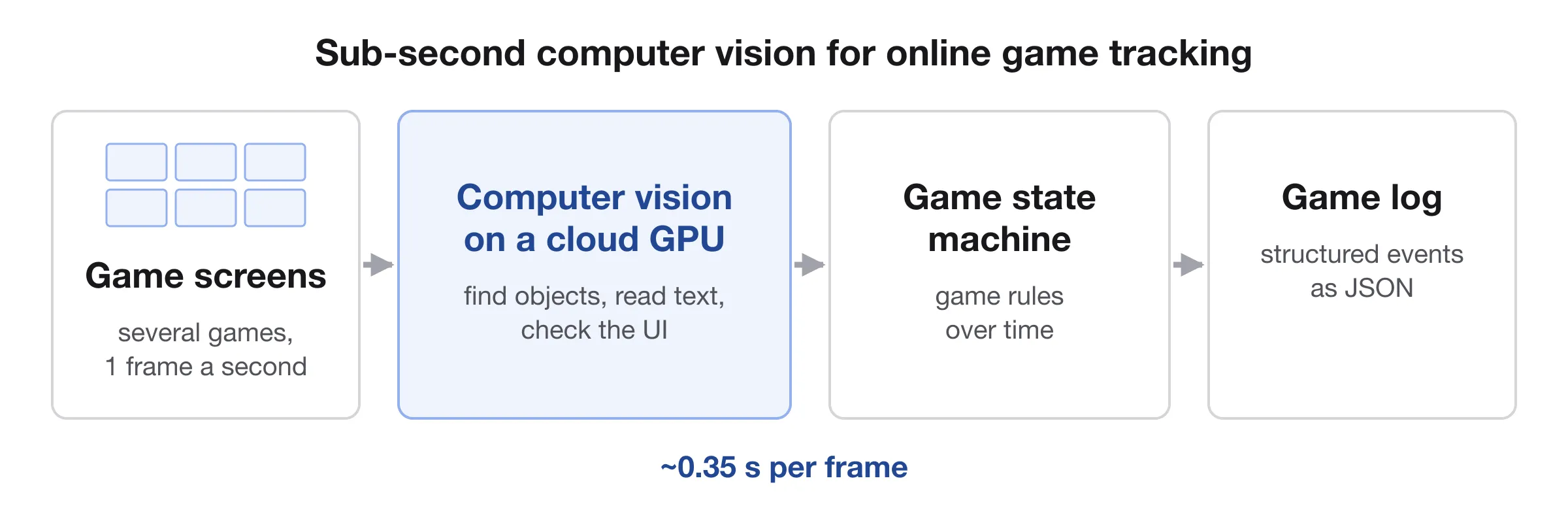
Online Game Tracking: Sub-Second Computer Vision
Sub-second computer vision MVP that turns a live stream of game windows into a game log in ~0.35 s a frame on a cloud GPU: YOLO11n, PaddleOCR, TensorRT.
In short: in 2025 I designed and coded a sub-second computer vision MVP for an online gaming analytics company, leading a small dvhb R&D team, and we built it from scratch in three months. It reads a live screen stream with several games in every frame, once a second, recognises what is on each game window and turns it into a structured game log in about a third of a second per frame, on cloud GPUs.
| Project | Online game tracking |
|---|---|
| Client | Online gaming analytics company |
| Year | 2025, three months |
| My role | Solution architect, R&D team lead and hands-on engineer at dvhb |
| Team | 5 people including me, plus 2 advisors: full-stack, DevOps, CV/ML, data annotation |
| Stage | Working MVP on a cloud GPU, handed over to the client |
| Tech | Python, asyncio, YOLO11n, PyTorch, PaddleOCR, TensorRT, OpenCV, CUDA, NVIDIA RTX 4090, FastAPI, WebSocket, RTMP, Pydantic, GitHub Actions, Sentry |
The problem#
Online games had to be tracked from the screen alone: every game window in a live stream read and turned into a structured log of game events. The data had to be collected independently of the game platforms, for different games, platforms and screen setups.
We found that one frame per second is enough not to miss a change in the game state, so 1 FPS became the input rate. That set two limits:
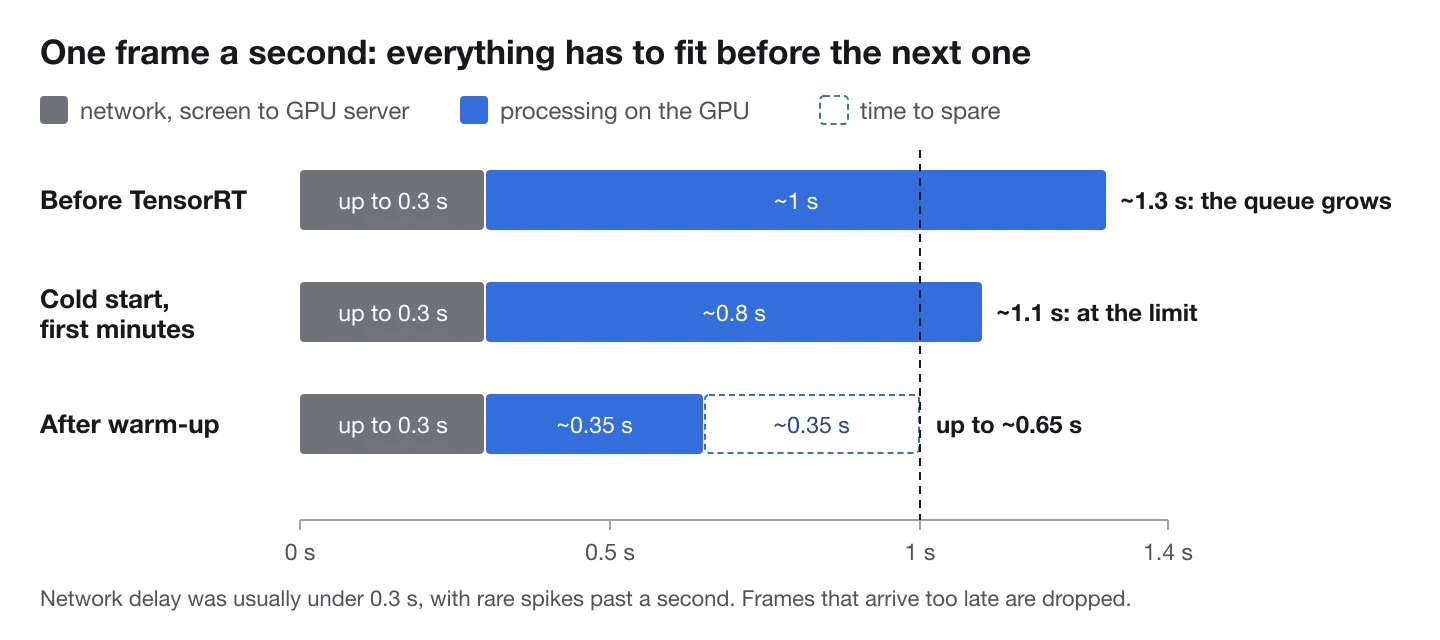
- Speed. The GPUs were in the cloud, far from the screens, and network delay, usually under 300 ms, took part of every second. Processing had to be sub-second with room to spare, or a queue builds up and the log falls behind the game. Large vision-language models are far too slow for that budget, so it had to be a pipeline of small, specialised models, tuned for speed.
- Scale. One GPU server can only process so many streams, so the pipeline had to scale out to track more players: we designed a flexible setup that rolls out as many cloud GPU servers as the current load needs.
What we built#
From screen to game state#
A frame receiver takes any screen stream, over RTMP or as WebSocket frames, and never lets a queue build up: when processing falls behind, only the freshest frame goes in and stale ones are dropped. Dropping has a price, though. On a busy screen, where some game changes every second, losing about one frame in six meant losing events, so the real answer had to be speed.
Every frame is then cut into regions of interest by a layout. The layouts are configurable, so one system works for any platform, screen size and number of games at once: up to 9 games per screen and up to 40 regions per game window. Each region goes to the model that fits it, and the three models run in parallel on every frame: YOLO detection and classification for the game objects, OpenCV matching for UI markers and buttons, and PaddleOCR for text.
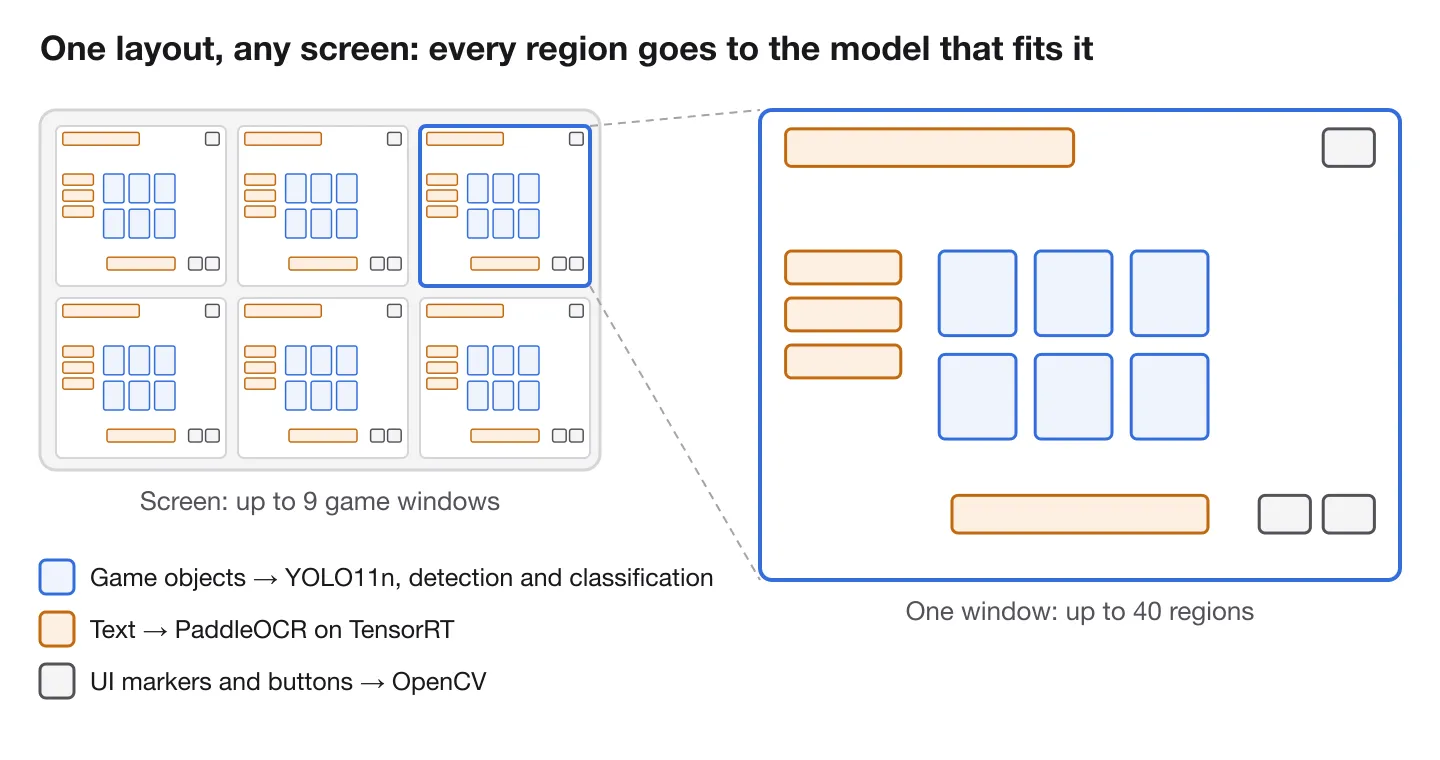
Small models won, even on a server GPU. The nano YOLO model ran in about 25 ms against 80 ms for the medium one, with almost the same accuracy: for small objects on a screen, a bigger network adds little, and in a one-second budget every millisecond counts.
For text, we compared three OCR libraries and chose PaddleOCR: it was the most accurate on small screen text, with a permissive licence and a record in production. Its catch was speed, and OCR became the bottleneck: about 6 seconds per frame on a CPU and still nearly 2 seconds on a GPU. Moving it to TensorRT brought it to about 0.35 seconds. Known regions didn't let us skip text detection, though: letting PaddleOCR find the text inside each region and then read it was about three times faster than reading the whole region, and an empty margin around the text made the model drop a first or last character even when it was confident.
A game state machine#
Recognising a frame is only half the job, because a single frame can lie: animations, transition screens and objects still moving into place all look like real events for a moment. The game state machine puts the rules of the game into code. It matches the series of events across frames against the flow of the game, accepts an object only once it has settled, and works out the state of every game on every frame. On each finished event it writes a structured game log and sends it as JSON over REST.
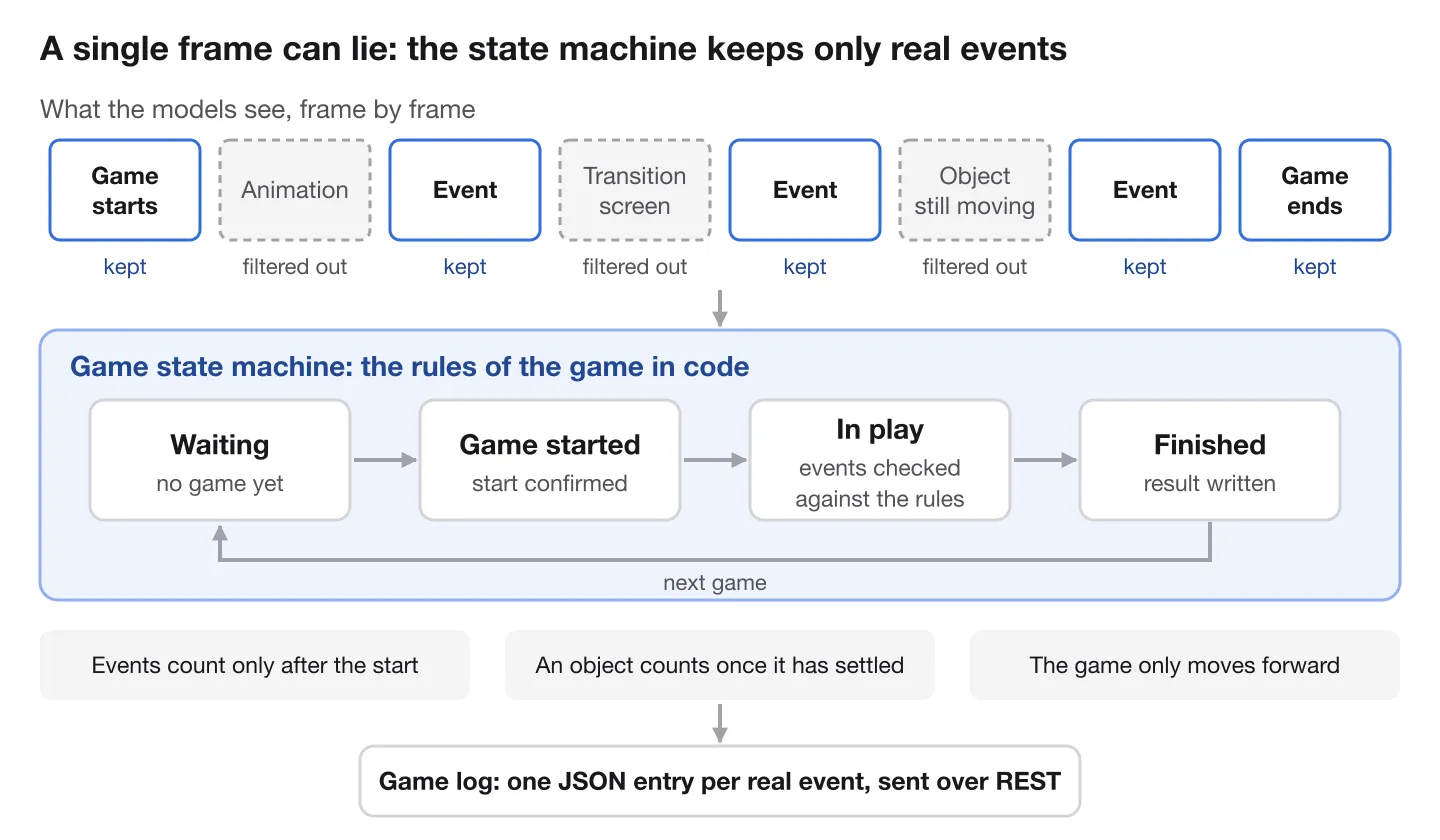
The rules also shaped the models. A missed object is the worst error and a wrong class the next, while an extra candidate is the cheapest, because the state machine knows how many objects each place on the screen can hold and drops the rest. So the detector runs at a deliberately low confidence threshold.
Data and evals#
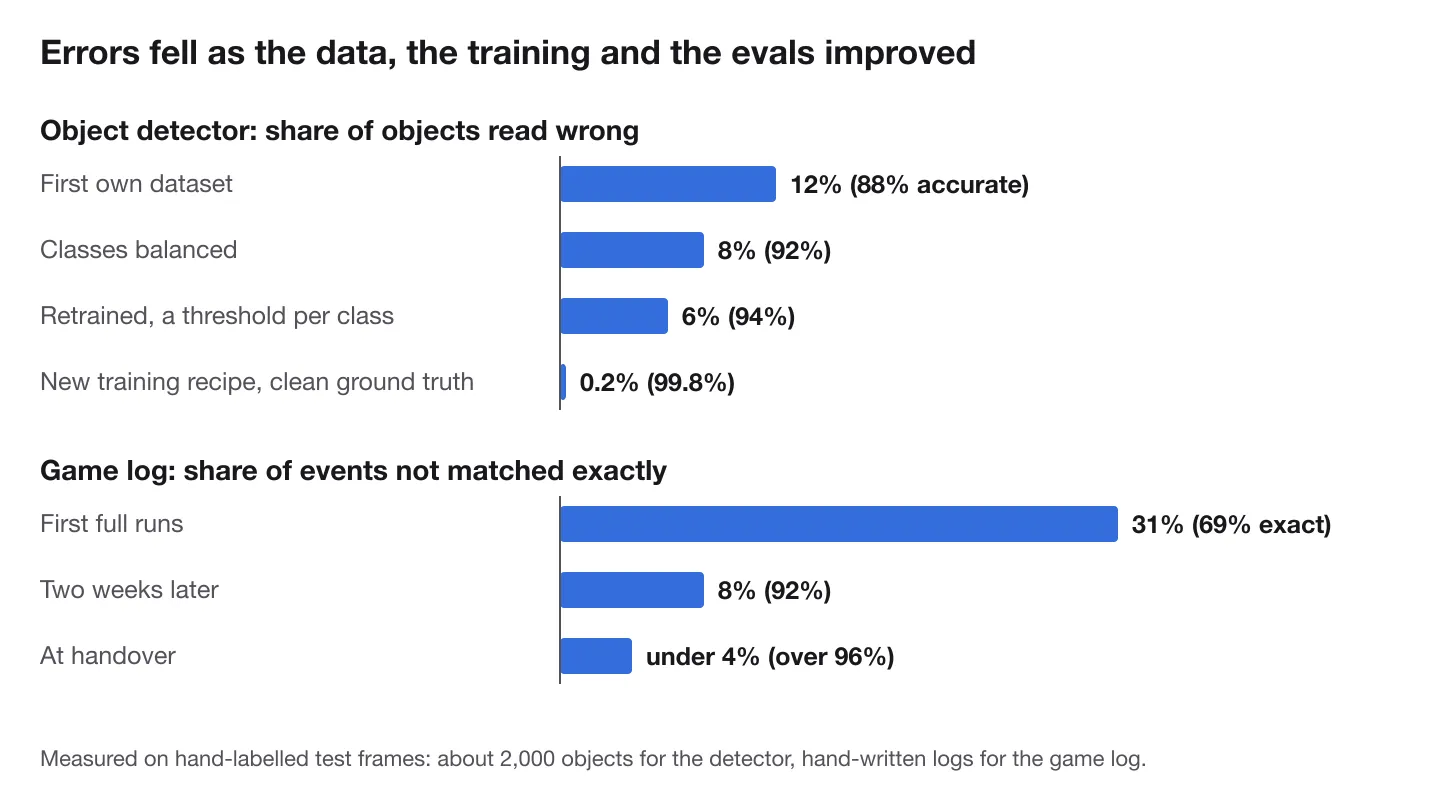
The models are only as good as the data. We didn't draw boxes by hand: the layouts already knew where every region was, so the annotator only typed what each region showed and a script wrote the training labels. That way we labelled almost 5,000 regions, with our own browser tools for objects, text and UI markers. Some classes were very rare, one turned up once in about 9,000 objects, so I balanced the classes with a little synthetic data, made by hand.
On a dataset this small, a single wrong label moves the metrics noticeably, so every label was triple-checked. One of the checks ran the trained model back over its own training set to catch the labels it disagreed with.
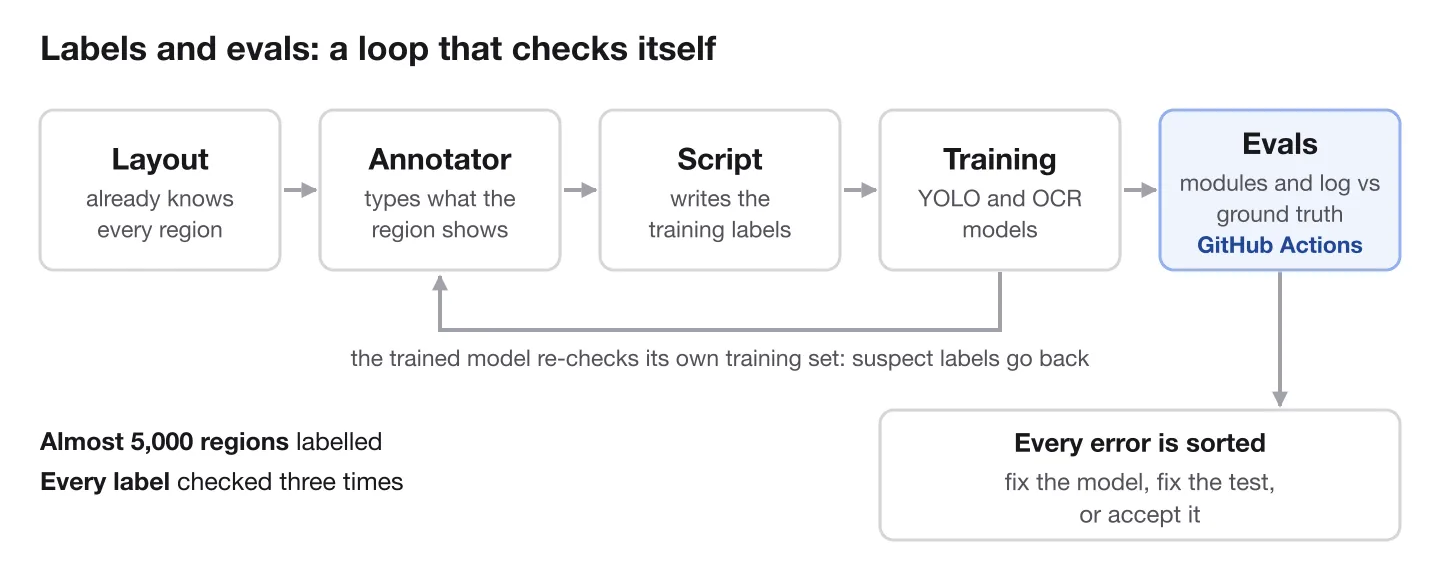
Evals mattered as much as the models. Any change to a model or to the pipeline can improve one thing and break another, so you have to see what each change does to the end result. I automated the evaluations: scripts compare every module and the final game log with a hand-labelled ground truth, and they run in GitHub Actions, so every change showed at once whether results got better or worse. The evals needed checking too. Many apparent model errors were mistakes in the ground truth: a box in the wrong place, or an object the model saw and the labeller missed. Every remaining error was sorted: fix the model, fix the test, or accept it.
The biggest jump came without new data#
In the third month the detector stood at about 94%, and more data wasn't the answer. The problem was in the training itself: the rectangular training mode had silently switched off mosaic augmentation. We turned mosaic back on and made it stronger, trained for 600 epochs, and added class-agnostic NMS at inference, which cut false detections from about 7% to 0.3%. With the same data and the same small nano model, so at the same speed, the detector passed 99.5%, and the final measurement on the test set was about 99.8%.
Architecture#
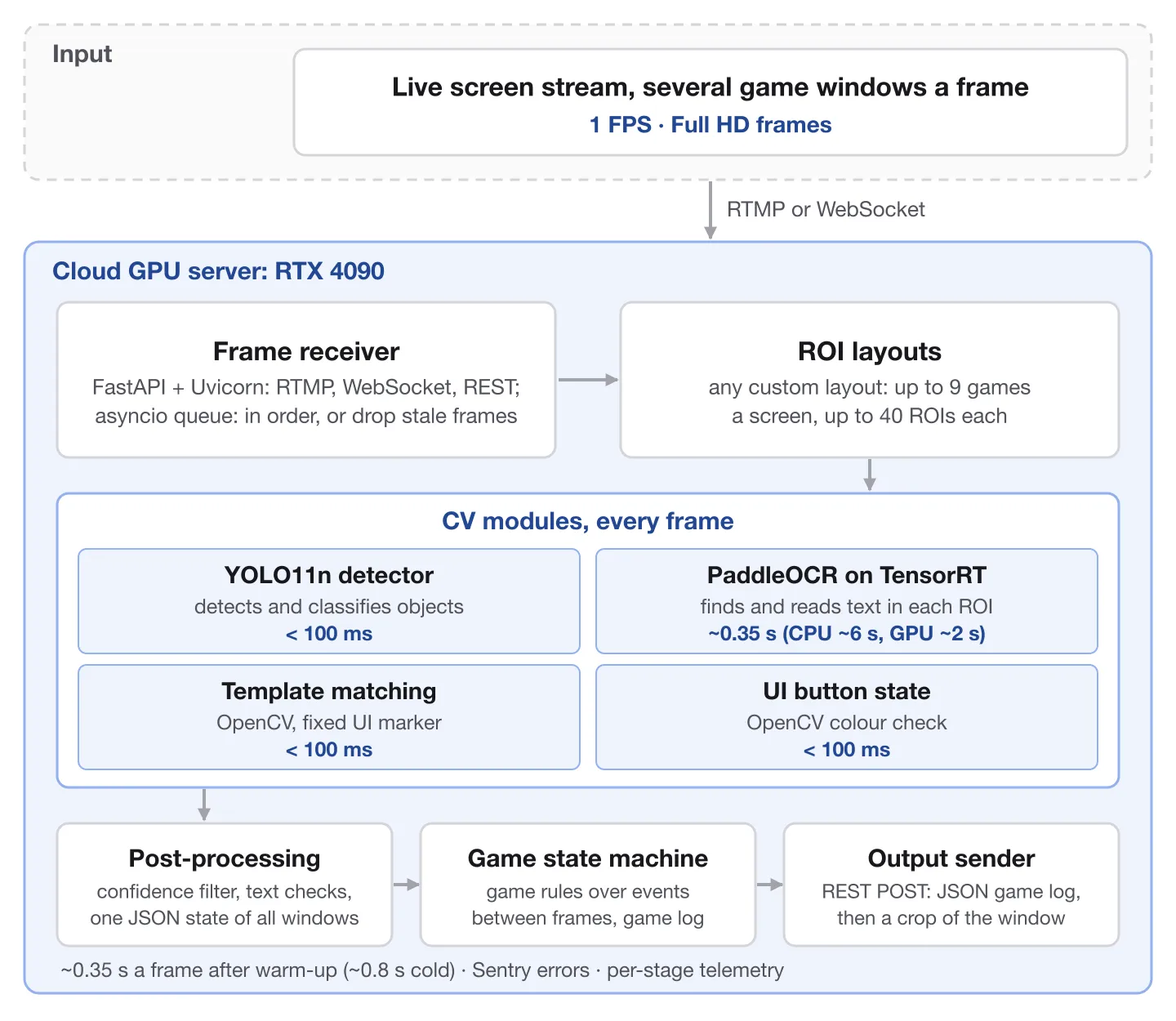
Everything ran on GPU servers with NVIDIA RTX 4090 GPUs, deployed and tested through GitHub Actions. Three problems took more effort than the models:
- Hardware. The GPU market of early 2025 was split three ways: virtual GPU servers in clouds such as Google Cloud, bare-metal GPU servers, and container-only GPU clouds made for straightforward training or inference, such as Vast.ai, which we used for training. Each had limits that took time to find. On Google Cloud, for reasons we never pinned down, PaddleOCR on TensorRT ran slower than without it, and an older GTX 1080 server couldn't run our TensorRT version at all. The most reliable option was bare-metal servers with an RTX 4090, rented from Hostkey, with a plan to move to Google Cloud later.
- Dependencies. A sub-second pipeline of several models only works if everything fits together, down to the order of installation: Ubuntu and its system packages, the NVIDIA driver, CUDA and TensorRT, then Python and its environment with TensorRT, PyTorch and PaddlePaddle builds made for that exact CUDA version, then PaddleOCR, Ultralytics and NumPy. The window was tiny: the next TensorRT version already pulled in a newer CUDA that PyTorch and PaddleOCR didn't support yet. We wrote the server set-up down step by step and scripted the Python side into the deploy workflow, so every new server came up the same way.
- Warm-up. No documentation covered PaddleOCR on TensorRT, and the first runs looked like a dead end. TensorRT builds an optimised engine for every input shape it meets, and at first it didn't keep them: a cold start took 5–6 minutes, 20 seconds of idle cooled the process down again, and a different number of game windows meant a new shape and more minutes of warm-up. We kept at it because nothing else gave PaddleOCR's accuracy at sub-second speed. In the end the process stays warm at all times and builds its shapes before a session: a live session starts at about 0.8 s a frame and settles at about 0.3 s within five minutes. A fallback was ready too: one warm process for each common number of windows.
Tech stack#
- Models: YOLO11n on Ultralytics and PyTorch for object detection and classification, PaddleOCR on PaddlePaddle for text, OpenCV for template matching and colour checks.
- GPU inference: NVIDIA RTX 4090, CUDA 12.6 and TensorRT 10.7, with PyTorch and PaddlePaddle builds matched to that exact CUDA version.
- Pipeline: Python 3.12 and asyncio: a producer–consumer frame queue that keeps frames in order or drops stale ones, with the three CV modules running in parallel threads on every frame and Pydantic models for every frame result and log entry.
- API: FastAPI on Uvicorn, with RTMP or WebSocket input and REST output.
- Operations: bare-metal GPU servers on Ubuntu, systemd services, GitHub Actions with self-hosted GPU runners for every deploy and eval run, Sentry for errors and performance tracing, and our own per-stage timing for every frame.
- Data and training: our own browser annotation tools, hand-made synthetic data, training on rented GPUs at Vast.ai, and evals against a hand-labelled ground truth in CI.
Results#
Measured on a hand-labelled test set of about 70 frames:
- Object detector: about 99.8% accuracy on about 2,000 objects.
- OCR: 99.9% accuracy on over 5,000 text values.
- UI marker and button state: 100%.
- Speed: about 0.35 s per frame after warm-up (about 0.8 s cold). Including network delay, a screenshot usually becomes a game log entry in about half a second, well inside the one-second budget of a 1 FPS stream.
- Load: one stream used about a quarter of an RTX 4090.
How we worked: an AI coding agent and senior engineers#
Before this project, I had used AI only for small experimental apps. One of them tried to make OpenAI's voice model place phone calls for me through Twilio, because I hate making calls. It failed on complexity, but it taught me something useful: Cursor, or any IDE with an AI chat, is an excellent tool for writing technical specs and for the quick probes and experiments that test them.
That's how this project began. It was deep R&D, so I wrote the specs in Markdown and checked every risky idea with a quick experiment written with the agent. The experiments that worked became the architecture, and the senior engineers turned them into production code. All of it cost about $600 in AI tokens, little for a project like this.
I worked in Cursor with Claude 3.5 Sonnet, then Claude 3.7 Sonnet, and Gemini 2.5 Pro as soon as it came out, with GPT-4o as a third opinion. Gemini 2.5 Pro was usually the strongest, but each model had cases where it beat the others, so I used all of them. We split the work by how far an agent could be trusted with it:
- Architecture: the two advisors, experienced in high-load and ML systems, reviewed the architecture decisions and helped with the hardest problems.
- DevOps and MLOps: a senior DevOps engineer built the core: the GPU servers, the deploy and the runners. I maintained and extended it with the agent, and he reviewed the changes.
- Pipeline: a full-stack engineer took my agent-written concepts and rebuilt them into a reliable asynchronous pipeline.
- API: written about half by the agent and half by hand.
- Game state machine: written by hand only; its logic was too complex for an agent.
- CV models: where the agent's understanding of computer vision ran out, a senior CV engineer tuned YOLO training and inference for higher accuracy.
What worked with the agent:
- Specs first. Markdown specs, kept up to date and fed into the prompts.
- Tests and comments from day one, written by the agent and read by me.
- Small files, 500 lines at most, so the agent could keep a whole file in view.
- Established tech. Models know Python and well-known libraries best. For anything newer, we copied its documentation and working examples into the project and asked the agent to follow them.
- Fresh starts. When the agent went in circles, it was faster to step back and start over.
It was weakest where the environment mattered. AI helps with DevOps, but it makes heavy mistakes there: the conditions for installing CUDA and TensorRT, and TensorRT's input shapes, had to be worked out by hand. The trickiest part was running PaddleOCR on TensorRT, and the DevOps engineer and I got it working in the end.
We also connected Sentry to Cursor ourselves, so the agent could read the pipeline's errors while debugging. Sentry released its own MCP server later, and only then did that kind of link reach every coding tool.
Judgement stayed with people. On a long run of about 8,000 frames the game log fell apart, and it looked like broken game rules. The real cause was the server numbering frames as they arrived instead of keeping their source numbers, so they came out of order. A rewrite of the log code had already started; I stopped it, because new logic would have hidden the cause. Once the order was fixed, the log became measurable.
The team#
I led a team of five at dvhb: a full-stack engineer, a senior DevOps engineer, a senior computer vision engineer and a data annotator, with a data scientist and a principal architect for high-load computer vision systems as advisors.
Working on something similar?#
If you need computer vision that reads screens, video or camera feeds in real time on a tight GPU budget, tell me about your case and we'll see whether I can help.